
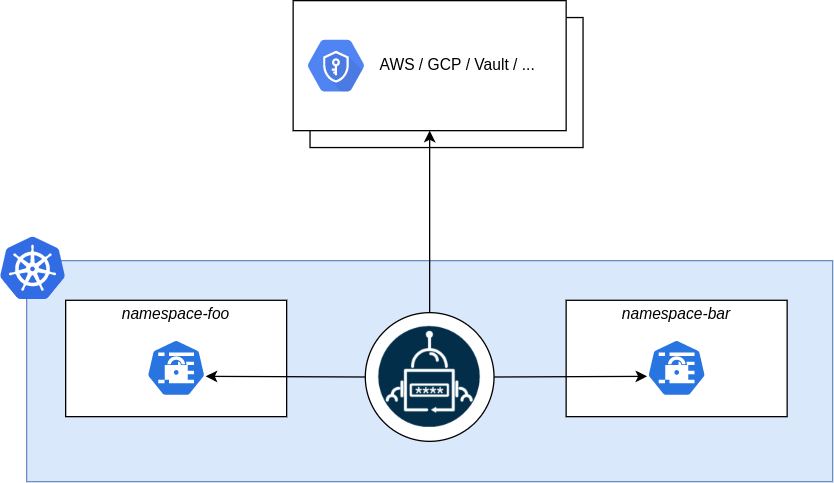
External Secrets Operator is a Kubernetes operator that can be used to connect your cluster with your external secret management systems. This operator supports a variety of secret management systems, including AWS Secrets Manager, HashiCorp Vault, Google Secrets Manager, Azure Key Vault, IBM Cloud Secrets Manager, CyberArk Secrets Manager, Pulumi ESC, and many others. The operator does this by connecting with the external secret management systems through the API and injecting the data directly into a Kubernetes Secret within your cluster.
Installing External Secrets Operator with Helm
External secrets operator runs as a deployment within your Kubernetes environment. It makes use of CustomResourceDefinitions to set up and connect to secret providers through SecretStore resources, and it manages Kubernetes secret resources through the use of ExternalSecret resources.
When installing with Helm, the default option is to install and manage the CRDs as part of your helm release. If you don’t wish to have the CRDs automatically upgraded and managed, you must set the installCRDs option to false.
Install the CRDs outsude of Helm using the following command:
kubectl apply -f "https://raw.githubusercontent.com/external-secrets/external-secrets/refs/heads/main/deploy/crds/bundle.yaml" --server-sideSample Output:
customresourcedefinition.apiextensions.k8s.io/clusterexternalsecrets.external-secrets.io serverside-applied
customresourcedefinition.apiextensions.k8s.io/clusterpushsecrets.external-secrets.io serverside-applied
customresourcedefinition.apiextensions.k8s.io/clustersecretstores.external-secrets.io serverside-applied
customresourcedefinition.apiextensions.k8s.io/externalsecrets.external-secrets.io serverside-applied
customresourcedefinition.apiextensions.k8s.io/pushsecrets.external-secrets.io serverside-applied
customresourcedefinition.apiextensions.k8s.io/secretstores.external-secrets.io serverside-applied
customresourcedefinition.apiextensions.k8s.io/acraccesstokens.generators.external-secrets.io serverside-applied
customresourcedefinition.apiextensions.k8s.io/cloudsmithaccesstokens.generators.external-secrets.io serverside-applied
customresourcedefinition.apiextensions.k8s.io/clustergenerators.generators.external-secrets.io serverside-applied
customresourcedefinition.apiextensions.k8s.io/ecrauthorizationtokens.generators.external-secrets.io serverside-applied
customresourcedefinition.apiextensions.k8s.io/fakes.generators.external-secrets.io serverside-applied
customresourcedefinition.apiextensions.k8s.io/gcraccesstokens.generators.external-secrets.io serverside-applied
customresourcedefinition.apiextensions.k8s.io/generatorstates.generators.external-secrets.io serverside-applied
customresourcedefinition.apiextensions.k8s.io/githubaccesstokens.generators.external-secrets.io serverside-applied
customresourcedefinition.apiextensions.k8s.io/grafanas.generators.external-secrets.io serverside-applied
customresourcedefinition.apiextensions.k8s.io/mfas.generators.external-secrets.io serverside-applied
customresourcedefinition.apiextensions.k8s.io/passwords.generators.external-secrets.io serverside-applied
customresourcedefinition.apiextensions.k8s.io/quayaccesstokens.generators.external-secrets.io serverside-applied
customresourcedefinition.apiextensions.k8s.io/sshkeys.generators.external-secrets.io serverside-applied
customresourcedefinition.apiextensions.k8s.io/stssessiontokens.generators.external-secrets.io serverside-applied
customresourcedefinition.apiextensions.k8s.io/uuids.generators.external-secrets.io serverside-applied
customresourcedefinition.apiextensions.k8s.io/vaultdynamicsecrets.generators.external-secrets.io serverside-applied
customresourcedefinition.apiextensions.k8s.io/webhooks.generators.external-secrets.io serverside-applied
Confirm that the CRDs are there:
kubectl get crds | grep externalSample Output:
acraccesstokens.generators.external-secrets.io          2026-02-04T09:33:41Z
cloudsmithaccesstokens.generators.external-secrets.io   2026-02-04T09:33:41Z
clusterexternalsecrets.external-secrets.io              2026-02-04T09:33:39Z
clustergenerators.generators.external-secrets.io        2026-02-04T09:33:42Z
clusterpushsecrets.external-secrets.io                  2026-02-04T09:33:39Z
clustersecretstores.external-secrets.io                 2026-02-04T09:33:40Z
ecrauthorizationtokens.generators.external-secrets.io   2026-02-04T09:33:42Z
externalsecrets.external-secrets.io                     2026-02-04T09:33:40Z
fakes.generators.external-secrets.io                    2026-02-04T09:33:42Z
gcraccesstokens.generators.external-secrets.io          2026-02-04T09:33:42Z
generatorstates.generators.external-secrets.io          2026-02-04T09:33:42Z
githubaccesstokens.generators.external-secrets.io       2026-02-04T09:33:43Z
grafanas.generators.external-secrets.io                 2026-02-04T09:33:43Z
mfas.generators.external-secrets.io                     2026-02-04T09:33:43Z
passwords.generators.external-secrets.io                2026-02-04T09:33:43Z
pushsecrets.external-secrets.io                         2026-02-04T09:33:40Z
quayaccesstokens.generators.external-secrets.io         2026-02-04T09:33:43Z
secretstores.external-secrets.io                        2026-02-04T09:33:41Z
sshkeys.generators.external-secrets.io                  2026-02-04T09:33:43Z
stssessiontokens.generators.external-secrets.io         2026-02-04T09:33:43Z
uuids.generators.external-secrets.io                    2026-02-04T09:33:43Z
vaultdynamicsecrets.generators.external-secrets.io      2026-02-04T09:33:43Z
webhooks.generators.external-secrets.io                 2026-02-04T09:33:44Z
Install from Chart Repository
Then add the helm repository and install the operator as follows:
helm repo add external-secrets https://charts.external-secrets.io

helm install external-secrets \
   external-secrets/external-secrets \
    -n external-secrets \
    --create-namespace \
    --set installCRDs=false
Sample Output:
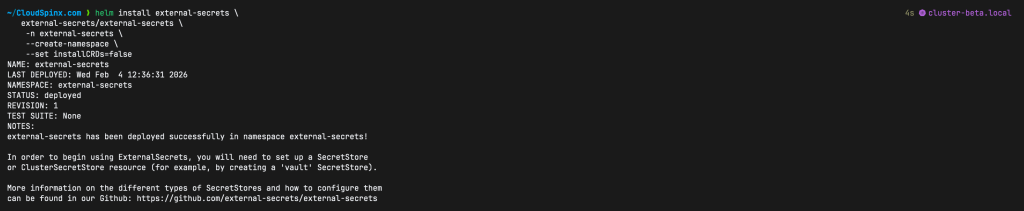
Then check that all the pods are running in the external-secrets namespace as follows:
$ kubectl get pods -n external-secrets
NAME                                               READY   STATUS    RESTARTS   AGE
external-secrets-7b8954bbc6-kmmcl                  1/1     Running   0          2m44s
external-secrets-cert-controller-96579c897-sl6ct   1/1     Running   0          2m44s
external-secrets-webhook-57d68f65f6-wdkzc          1/1     Running   0          2m44s
You can also check the api-resources associated with the operator:
$ kubectl api-resources | grep external
clusterexternalsecrets              ces                       external-secrets.io/v1                      false        ClusterExternalSecret
clusterpushsecrets                                            external-secrets.io/v1alpha1                false        ClusterPushSecret
clustersecretstores                 css                       external-secrets.io/v1                      false        ClusterSecretStore
externalsecrets                     es                        external-secrets.io/v1                      true         ExternalSecret
pushsecrets                         ps                        external-secrets.io/v1alpha1                true         PushSecret
secretstores                        ss                        external-secrets.io/v1                      true         SecretStore
acraccesstokens                                               generators.external-secrets.io/v1alpha1     true         ACRAccessToken
cloudsmithaccesstokens                                        generators.external-secrets.io/v1alpha1     true         CloudsmithAccessToken
clustergenerators                                             generators.external-secrets.io/v1alpha1     false        ClusterGenerator
ecrauthorizationtokens                                        generators.external-secrets.io/v1alpha1     true         ECRAuthorizationToken
fakes                                                         generators.external-secrets.io/v1alpha1     true         Fake
gcraccesstokens                                               generators.external-secrets.io/v1alpha1     true         GCRAccessToken
generatorstates                     gs                        generators.external-secrets.io/v1alpha1     true         GeneratorState
githubaccesstokens                                            generators.external-secrets.io/v1alpha1     true         GithubAccessToken
grafanas                                                      generators.external-secrets.io/v1alpha1     true         Grafana
mfas                                                          generators.external-secrets.io/v1alpha1     true         MFA
passwords                                                     generators.external-secrets.io/v1alpha1     true         Password
quayaccesstokens                                              generators.external-secrets.io/v1alpha1     true         QuayAccessToken
sshkeys                                                       generators.external-secrets.io/v1alpha1     true         SSHKey
stssessiontokens                                              generators.external-secrets.io/v1alpha1     true         STSSessionToken
uuids                                                         generators.external-secrets.io/v1alpha1     true         UUID
vaultdynamicsecrets                                           generators.external-secrets.io/v1alpha1     true         VaultDynamicSecret
webhooks                                                      generators.external-secrets.io/v1alpha1     true         Webhook
Using External Secrets Operator
For the purposes of the demo in this guide, let’s create a secret containing my AWS account credentials, and don’t worry, they are only dummy keys, and not valid.
Let’s create a secret as follows:
echo -n 'BJBVQ2X66EFT4YJXPMRO' > ./access-key-id
echo -n 'gmOrd8v-fnqN77rfNQtm55yuGKF6pRSw\GHTQ3aK' > ./secret-access-key
kubectl create secret generic awssm-secret --from-file=./access-key-id --from-file=./secret-access-key
Then define a secret store as follows:
sudo tee ./basic-secret-store.yaml > /dev/null <<'EOF'
apiVersion: external-secrets.io/v1
kind: SecretStore
metadata:
  name: secretstore-sample
spec:
  provider:
    aws:
      service: SecretsManager
      region: us-east-1
      auth:
        secretRef:
          accessKeyIDSecretRef:
            name: awssm-secret
            key: access-key-id
          secretAccessKeySecretRef:
            name: awssm-secret
            key: secret-access-key
EOF
Apply the manifest to create the secret store:
kubectl apply -f basic-secret-store.yamlDefine an external secret as follows:
sudo tee ./basic-external-secret.yaml > /dev/null <<'EOF'
apiVersion: external-secrets.io/v1
kind: ExternalSecret
metadata:
  name: sample-external-secret
spec:
  refreshInterval: 1h0m0s
  secretStoreRef:
    name: secretstore-sample
    kind: SecretStore
  target:
    name: db-credentials
    creationPolicy: Owner

# For a single key in one secret
  data:
  - secretKey: password
    remoteRef:
      key: prod/db/password # name of the key in aws secrets manager

## For multiple keys in one secret, use dataFrom: instead of data:
  dataFrom:
  - extract:
      key: dev/db/credentials # name of the key in aws secrest manager
EOF
My secret in AWS Secrets Manager is as follows:
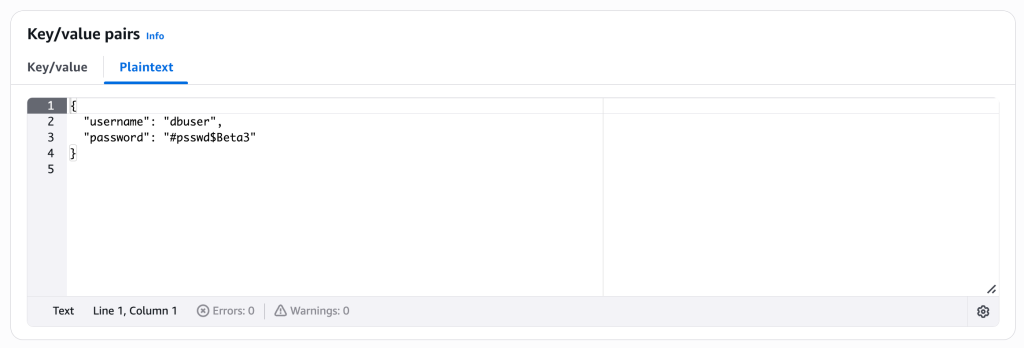
So I used the dataFrom: instead of data:.
Apply the manifest to create the key:
kubectl apply -f basic-external-secret.yamlCheck that the secret has been created:
$ kubectl get externalsecret
NAME                     STORETYPE     STORE                REFRESH INTERVAL   STATUS         READY
sample-external-secret   SecretStore   secretstore-sample   1h0m0s             SecretSynced   True
Describe the secret to see the full details:
kubectl describe externalsecret sample-external-secretSample Output:
Name:         sample-external-secret
Namespace:    default
Labels:       <none>
Annotations:  <none>
API Version:  external-secrets.io/v1
Kind:         ExternalSecret
Metadata:
  Creation Timestamp:  2026-02-04T11:49:51Z
  Finalizers:
    externalsecrets.external-secrets.io/externalsecret-cleanup
  Generation:        1
  Resource Version:  9132864
  UID:               39833ddd-b5cf-47b8-84c1-28215fb549d7
Spec:
  Data From:
    Extract:
      Conversion Strategy:  Default
      Decoding Strategy:    None
      Key:                  dev/db/credentials
      Metadata Policy:      None
  Refresh Interval:         1h0m0s
  Secret Store Ref:
    Kind:  SecretStore
    Name:  secretstore-sample
  Target:
    Creation Policy:  Owner
    Deletion Policy:  Retain
    Name:             db-credentials
Status:
  Binding:
    Name:  db-credentials
  Conditions:
    Last Transition Time:   2026-02-04T11:49:52Z
    Message:                secret synced
    Reason:                 SecretSynced
    Status:                 True
    Type:                   Ready
  Refresh Time:             2026-02-04T11:49:51Z
  Synced Resource Version:  1-344b5e002febafa14fa2b8f8674005203bb27f953dd4aba043fb662c
Events:
  Type    Reason   Age    From              Message
  ----    ------   ----   ----              -------
  Normal  Created  2m27s  external-secrets  secret created
We get all the key-value pairs present over the remote secret store. These key-values can be passed in as environment variables as follows:
        env:
          - name: key1
            valueFrom:
              secretKeyRef:
                name: db-credentials
                key: username

          - name: key2
            valueFrom:
              secretKeyRef:
                name: db-credentials
                key: password
We can check that both values are stored in the secret by running the following commands:
kubectl get secret db-credentials -n <namespace> -o jsonpath='{.data.username}' | base64 -d
kubectl get secret db-credentials -n <namespace> -o jsonpath='{.data.surname}' | base64 -d
Sample Output:

There you have it, we hope that this guide was helpful to you. Thanks for sticking with us. Please out our other guides below: